

A freelance designer in Jaipur sends her bank details to a new client in Pune. The client’s banking app asks him to pick a branch, and she has no idea which one to give, because she has never set foot in an Airtel Payments Bank branch. Her first payment sits in limbo for a day while they sort it out. If you’re searching for the airtel payment bank ifsc code, you’re probably in the same spot, and the fix takes about ten seconds.
The answer is below, and so is everything that usually goes wrong around it: which account number to share, what happens near the ₹2 lakh limit and why a transfer can bounce back. The team at The Vishal Media checked these details against Airtel Payments Bank’s own published terms rather than repeating directory listings, several of which leave key fields blank or misspelled.
Airtel Payment Bank IFSC Code at a Glance
Here’s everything a sender usually needs, in one place:
| Detail | Value |
|---|---|
| IFSC code | AIRP0000001 |
| Bank name | Airtel Payments Bank |
| Branch | Airtel Payments Bank, Gurugram, Haryana |
| Branch address | Airtel Center, Plot No. 16, Udyog Vihar Phase 4, Gurugram, Haryana |
| MICR code | Not applicable (no cheque book issued) |
| SWIFT code | Not applicable (no international transfers) |
| Transfer modes | NEFT, IMPS, RTGS and UPI |
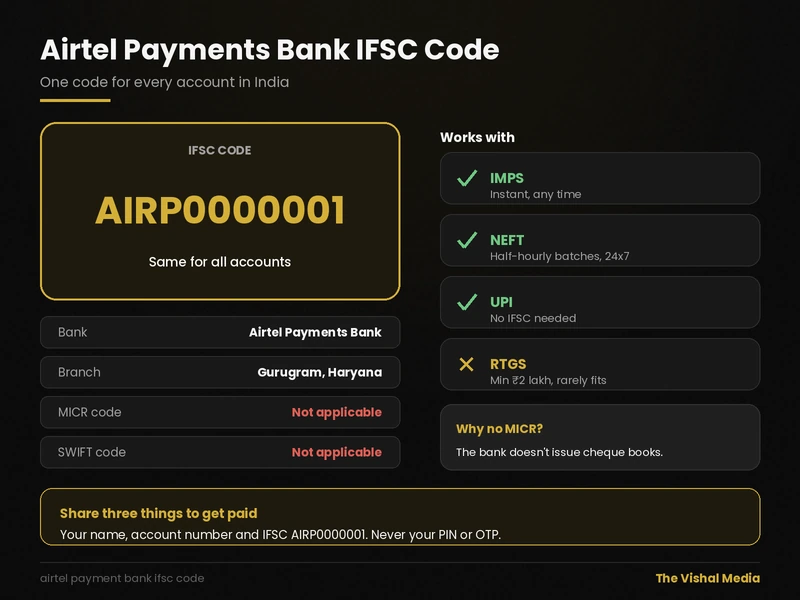
Every Airtel Payments Bank account uses this single code, whether the account holder lives in Kerala or Kashmir. That’s because the bank runs its accounts through one central branch and serves customers through its app and local banking points instead of a network of full branches. So if a banking app asks for a branch, choose the Gurugram branch linked to AIRP0000001.
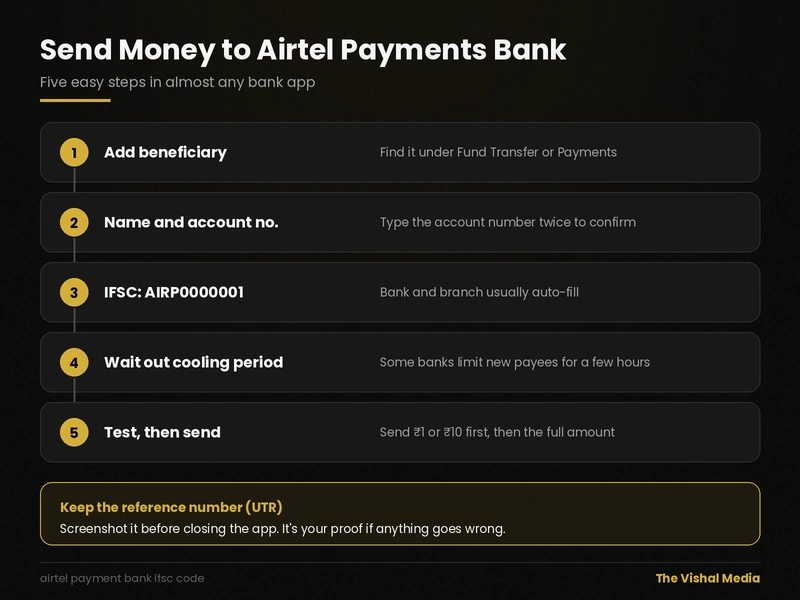
How to Send Money to an Airtel Payments Bank Account in 5 Easy Steps
If you’re the one paying, these five steps work in almost any bank’s app or net banking.
Step 1: Open “Add beneficiary” or “Add payee”. You’ll usually find it under Fund Transfer or Payments.
Step 2: Enter the account holder’s name and account number. Type the account number twice if the app asks for confirmation. One wrong digit is the most common reason payments go astray.
Step 3: Enter the IFSC as AIRP0000001. Most apps auto-fill the bank and branch once you type the code. If your app asks you to choose from a list, search for “Airtel Payments Bank”.
Step 4: Wait out any beneficiary cooling period. Many banks limit how much you can send to a newly added beneficiary for the first few hours as a fraud check. If you’re paying a large amount, add the beneficiary a little in advance.
Step 5: Choose a transfer mode and send a small test amount first. Send ₹1 or ₹10, confirm with the receiver that it arrived, then send the full amount.
Which transfer mode should you pick?
| Mode | Best for | Good to know |
|---|---|---|
| IMPS | Urgent payments | Credits instantly, any time of day |
| NEFT | Regular payments | Runs round the clock in half-hourly batches |
| RTGS | Large single payments | Minimum ₹2 lakh, which rarely fits a payments bank account because of its balance cap |
| UPI | Small, everyday payments | Needs only the receiver’s UPI ID or a QR code, no IFSC |
Where to Find Your Airtel Payments Bank Account Number
If you’re the one receiving money, the sender needs three things from you: your name as per the bank account, your Airtel Payments Bank account number and the IFSC code.
You can see your account number in the banking section of the Airtel Thanks app, under your account details.
Here’s a common mix-up worth clearing: many people assume their registered mobile number is their account number. According to Airtel Payments Bank’s savings account terms, the mobile number works as your Customer ID for login, while the account number is allotted separately. The terms add that the account number does not change even if you port or change your mobile number. So always copy the account number from the app instead of sharing your phone number.
Safe to share: your name, account number and IFSC. Never share: your MPIN, UPI PIN, OTP, password or debit card details. No sender needs these to pay you.
The ₹2 Lakh Balance Limit and What Happens to Extra Money
Payments banks work under a special RBI licence, and one of its rules is that a customer’s end-of-day balance can’t go above ₹2 lakh.
Airtel Payments Bank keeps its own working limits slightly lower, according to its savings account terms:
-
₹1.92 lakh if you don’t have a sweep account
-
₹1.97 lakh if you have a sweep account
What is the sweep account? With your consent, the bank can open a linked savings account for you with Suryoday Small Finance Bank and automatically move (“sweep out”) the extra balance there. That money is covered by DICGC deposit insurance, and it earns interest at Suryoday’s rates. The terms also say the bank starts the sweep account process once your end-of-day balance crosses ₹75,000.
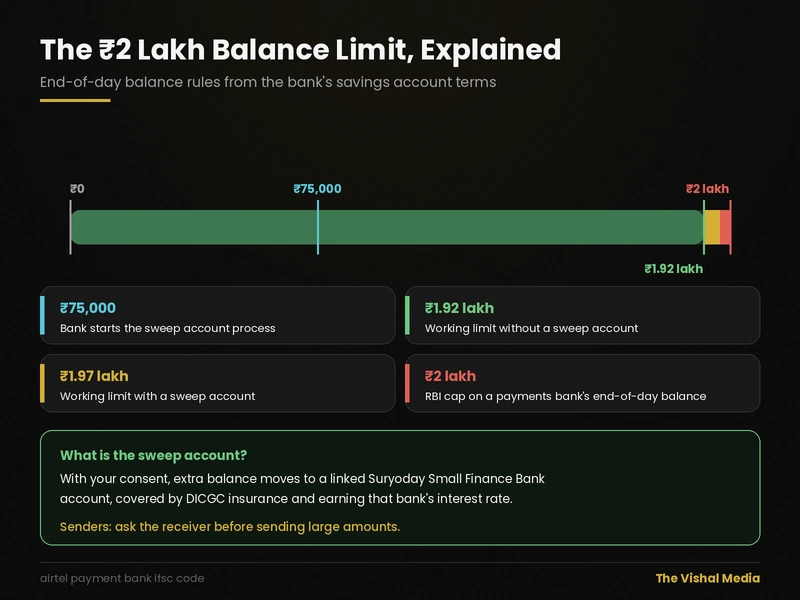
What this means for senders: before transferring a large amount, ask the receiver whether their account can take it. A payment that would push them over the limit can be declined or sent back.
Why There’s No MICR Code (And Other Common Confusions)
Several IFSC directory sites show the MICR field as “NA” or even “undefined”, which leaves people wondering if something is wrong. Nothing is.
-
No MICR code: MICR codes are printed on cheques to speed up cheque clearing. Airtel Payments Bank’s terms say cheque book facilities are not currently available to customers, so there’s no MICR code to use.
-
No SWIFT code: SWIFT codes are for international transfers. For any transfer within India, the IFSC is enough.
-
Branch field in forms: if a form insists on a branch name, enter “Airtel Payments Bank, Gurugram” along with AIRP0000001.
-
Cheque deposits: since the bank doesn’t use cheques, someone wanting to pay you by cheque will need to transfer the money digitally instead.
Transfer Failed or Returned? Fixes That Work
Most problems fall into a handful of patterns. Here’s how to handle each one.
Wrong IFSC entered If the code belongs to another bank, the transfer usually fails or comes back to the sender. Re-add the beneficiary with AIRP0000001 and try again.
One digit wrong in the account number If the number doesn’t exist, the money normally returns to the sender. If it matches someone else’s account, contact your bank immediately with the transaction reference number.
Receiver’s balance limit reached The transfer may be declined or reversed. Ask the receiver to move some money out first, or send a smaller amount.
Name mismatch warning Some apps show the registered name before you confirm. If it doesn’t match the person you’re paying, stop and double-check the account number.
NEFT payment not credited yet NEFT settles in batches, so allow some time before worrying. If it still hasn’t arrived, ask your bank for the transaction status using the reference number.
In every case, the transaction reference number (often called UTR) is your proof. Screenshot it before you close the app.
How IFSC Routing Actually Works Behind the Scenes
From a software developer’s point of view, an IFSC code is simply an address label for money. Breaking down AIRP0000001 shows how it works:
| Part | Characters | Meaning |
|---|---|---|
| Bank code | AIRP | Identifies Airtel Payments Bank |
| Reserved digit | 0 | Always zero, kept for future use |
| Branch code | 000001 | Identifies the specific branch |
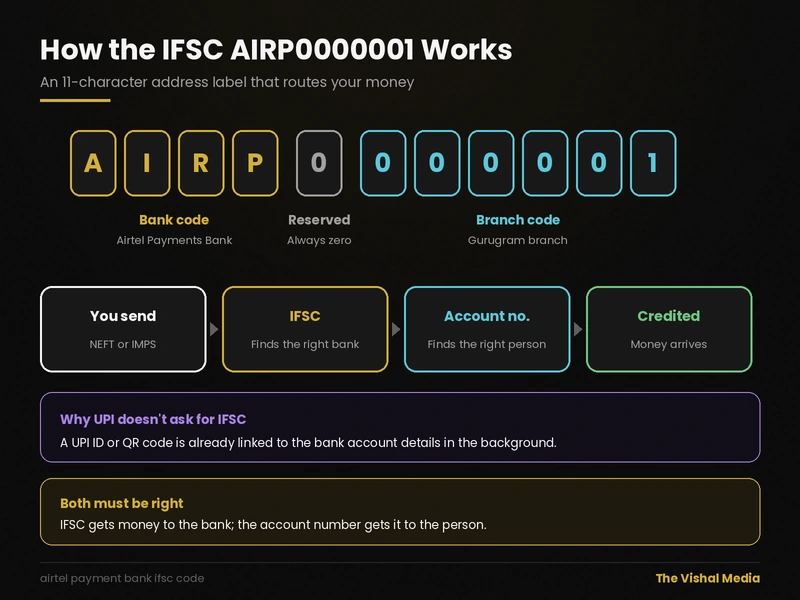
When you send money by NEFT or IMPS, the payment system reads the IFSC to decide which bank should receive the message. Once it arrives, Airtel Payments Bank’s own system uses the account number to credit the right customer. That’s why both pieces have to be correct: the IFSC gets the money to the right bank, and the account number gets it to the right person.
UPI skips this step for you. A UPI ID or QR code is already linked to the receiver’s bank account details in the background, which is why you can pay without ever typing an IFSC. If you want to double-check any bank’s IFSC, the Reserve Bank of India publishes the official list of codes on its website.
Stay Safe: Fake Customer Care and KYC Scams
Banking keywords attract scammers, and Airtel Payments Bank customers are no exception.
-
Fake customer care numbers often appear in search results and on social media. Take support numbers only from the Airtel Thanks app or the bank’s official website.
-
“Your KYC will expire” messages with links are a classic trap. Update KYC only through the official app or an authorised banking point.
-
Screen-sharing requests: no genuine bank executive needs to see your screen.
-
If you’ve been cheated, call the national cybercrime helpline 1930 or file a complaint on the National Cyber Crime Reporting Portal as soon as possible, and inform the bank through its official channels.
For more everyday habits that keep digital payments safe, our guide to easy technology covers five simple rules every new user should know.
Frequently Asked Questions
Is the Airtel Payments Bank IFSC code the same for all accounts?
Yes. Every Airtel Payments Bank account in India uses AIRP0000001, because the bank operates through a single central branch in Gurugram.
Is my mobile number my Airtel Payments Bank account number?
No. Your mobile number is your Customer ID for logging in, while the account number is allotted separately and stays the same even if you change your mobile number. Check the exact account number in the Airtel Thanks app.
Can I receive NEFT and IMPS in an Airtel Payments Bank account?
Yes. Senders can use NEFT or IMPS with your name, account number and IFSC AIRP0000001. IMPS credits almost instantly, while NEFT settles in half-hourly batches.
What is the MICR code of Airtel Payments Bank?
There isn’t one. MICR codes are used for cheques, and Airtel Payments Bank doesn’t currently offer cheque books.
What happens if someone sends more than ₹2 lakh to my Airtel Payments Bank account?
RBI rules don’t allow a payments bank account to hold more than ₹2 lakh at the end of the day. Depending on your account, the transfer may be declined or reversed, or, if you’ve opted for a sweep account, the excess can be moved to your linked Suryoday Small Finance Bank account.
Can I use UPI instead of IFSC to send money to Airtel Payments Bank?
Yes. If the receiver has a UPI ID or QR code linked to their Airtel Payments Bank account, you can pay through any UPI app without entering the IFSC or account number.
Keep These Details Handy
Getting the details right once saves you from chasing stuck payments later.
-
Save the details card at the top of this page so you can share your IFSC and branch in seconds.
-
Send this guide to the client or family member who’s about to pay you, so they get it right the first time.
-
Want to use digital payments more confidently? Read The Vishal Media’s guide to easy technology for safety rules and simple setup tips.
-
Got a question about another bank code or payment app? Ask us here, and browse more business guides.
Disclaimer
This article is for general information only and is not financial advice. Bank rules, limits and charges can change, so please check Airtel Payments Bank’s official website or app for the latest details. For questions about your own account, contact the bank only through its official customer care channels.